Microsoft Dot Net Master

Microsoft Dot Net Master

Thursday, February 2, 2017

Difference between ref and out parameters

Ref and out parameters are used to pass an argument within a method. In this article, you will learn the differences between these two parameters.

Ref

The ref keyword is used to pass an argument as a reference. This means that when value of that parameter is changed in the method, it gets reflected in the calling method. An argument that is passed using a ref keyword must be initialized in the calling method before it is passed to the called method.

Out

The out keyword is also used to pass an argument like ref keyword, but the argument can be passed without assigning any value to it. An argument that is passed using an out keyword must be initialized in the called method before it returns back to calling method.

Program with ref and out keyword

  1. public class Example
  2. {
  3. public static void Main() //calling method
  4. {
  5. int val1 = 0; //must be initialized
  6. int val2; //optional
  7.  
  8. Example1(ref val1);
  9. Console.WriteLine(val1); // val1=1
  10.  
  11. Example2(out val2);
  12. Console.WriteLine(val2); // val2=2
  13. }
  14.  
  15. static void Example1(ref int value) //called method
  16. {
  17. value = 1;
  18. }
  19. static void Example2(out int value) //called method
  20. {
  21. value = 2; //must be initialized
  22. }
  23. }
  24.  
  25. /* Output
  26. 1
  27. 2
  28. */

Note

  1. Do not be confused with the concept of passing by reference and the concept of reference type. These two concepts are not the same.
  2. A value type or a reference type can be passed to method parameter by using ref keyword. There is no boxing of a value type when it is passed by reference.
  3. Properties cannot be passed to ref or out parameters since internally they are functions and not members/variables.

Ref and out in method overloading

Both ref and out cannot be used in method overloading simultaneously. However, ref and out are treated differently at run-time but they are treated same at compile time (CLR doesn't differentiates between the two while it created IL for ref and out). Hence methods cannot be overloaded when one method takes a ref parameter and other method takes an out parameter. The following two methods are identical in terms of compilation.
  1. class MyClass
  2. {
  3. public void Method(out int a) // compiler error “cannot define overloaded”
  4. {
  5. // method that differ only on ref and out"
  6. }
  7. public void Method(ref int a)
  8. {
  9. // method that differ only on ref and out"
  10. }
  11. }
However, method overloading can be done, if one method takes a ref or out argument and the other method takes simple argument. The following example is perfectly valid to be overloaded.
  1. class MyClass
  2. {
  3. public void Method(int a)
  4. {
  5.  
  6. }
  7. public void Method(out int a)
  8. {
  9. // method differ in signature.
  10. }
  11. }
What do you think?
I hope you will enjoy the ref and out keywords while programming with C#. I would like to have feedback from my blog readers. Your valuable feedback, question, or comments about this article are always welcome.

What does each term in "public static void main(String[] args)" mean?

public is the visibility. This can be public, private, protected or (if you omit a value) default.
static is a special [optional] keyword that indicates that this method can be called without creating an instance of this class. Without it, you have to instantiate this class and call this method from the resulting object.
void is the return type of this method, indicating that this method doesn't return anything. Methods must have a return type.
main( ... ) is the name of this method. Methods have to be named. The parentheses indicate that this is a method.main() is special because it is the start of the program.
String[] args is a single parameter for the method. String[] is the type of the parameter, indicating an array of Strings. args is the name of the parameter. Parameters must be named.

Wednesday, January 18, 2017

Design Patterns in ASP.NET

Introduction

Design patterns provide general solutions or flexible way to solve common design problems. This article gives you a simple introduction regarding learning and understanding design patterns.
Before starting with design patters in .NET, let’s understand what is meant by design patterns and why it is useful in software programming?

What are Design Patterns in Software Programming?

Design Patterns in object oriented world is reusable solution to common software design problems which occur again and again in real world application development. It is a template or description for how to solve a problem which can be used in many different situations.
"A pattern is a recurring solution to a problem in a context."
"Each pattern describes a problem which occurs over and over again in our environment, and then describes the core of the solution to that problem, in such a way that you can use this solution a million times over, without ever doing it the same way twice."
-- Christopher Alexander - A Pattern Language
Patterns are used by developers to their particular design to solve their problems. Patterns usage and choice to choose among different design patterns is based on individual need and their problem.
Design patterns are the most powerful tool for software developer. It is important to understand design patterns rather than memorizing its classes, methods and properties. It is also important to learn how to apply pattern to specific problem to get the desired result. This will be required continuous practice of using and applying design patterns in day to day software development. First, identify the software design problem, then see how to address these problems using design patterns and find out the best suited design problem to solve the problem.
There are 23 design patterns also known as Gang of four design patterns (GoF). Gang of four are the authors of the book, “Design Patterns: Elements of Reusable Object Oriented Software”. These 23 patterns are grouped into three main categories based on their:
  • Creational Design Pattern
    1. Factory Method
    2. Abstract Factory
    3. Builder
    4. Prototype
    5. Singleton
  • Structural Design Patterns
    1. Adapter
    2. Bridge
    3. Composite
    4. Decorator
    5. Façade
    6. Flyweight
    7. Proxy
  • Behavioral Design Patterns
    1. Chain of Responsibility
    2. Command
    3. Interpreter
    4. Iterator
    5. Mediator
    6. Memento
    7. Observer
    8. State
    9. Strategy
    10. Visitor
    11. Template Method
In this article, we are learning and understanding Creational Design patterns in detail including UML diagram, template source code and real world example C#*.
Creational Design patterns provide a way to instantiate single object or group of related objects. These patterns deal with the process of object creation in such a way that they are separated from their implementing system. This way, it provides more flexibility in deciding which object needs to be created or instantiated for a given scenario. There are five such patterns:

1) Abstract Factory

It is used to create a set of related objects or dependent objects. The “family” of objects created by factory is determined at run-time according to the selection of concrete factory class.
Abstract factory pattern acts as super factory which creates other factories. In abstract factory, interface is responsible for creating a set of related objects or dependent objects without specifying their concrete classes.
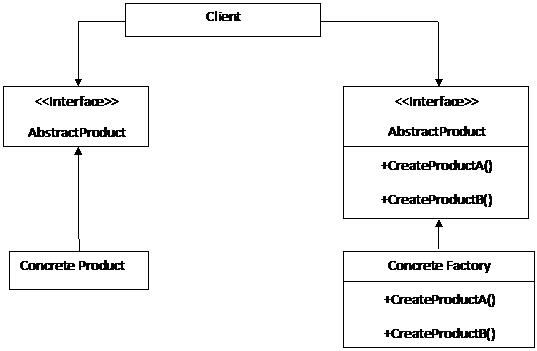
The UML class diagram below describes an implementation of the abstract factory design pattern:
The classes,objects and interfaces used in the above UML diagram is described below:
  1. Client: This class is used Abstract Factory and Abstract Product interfaces to create family of related objects.
  2. Abstract Factory: This is an interface which is used to create abstract products.
  3. Abstract Product: This is an interface which is used to declare type of products.
  4. Concrete Factory: This is a class which implements the abstract factory interface to create concrete products.
  5. Concrete Product: This is a class which implements the abstract product interface to create products.
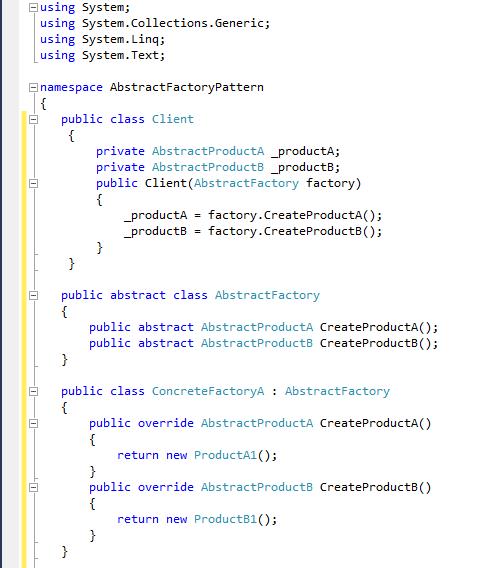
The following code shows the basic template code of the abstract factory design pattern implemented using C#.NET:
In the above abstract factory design pattern source code template client has two private fields that hold the instances of abstract product classes. These objects will be accessed by inheriting their base class interface. When a client is instantiated, a concrete factory object is passed to its constructor and populate private fields of client with appropriate data or value.
The Abstractfactory is base class to concrete factory classes which generate or create set of related objects. This base class contains methods definition for each type of object that will be instantiated. The base class is declared as Abstract so that it can be inherited by other concrete factory subclasses.
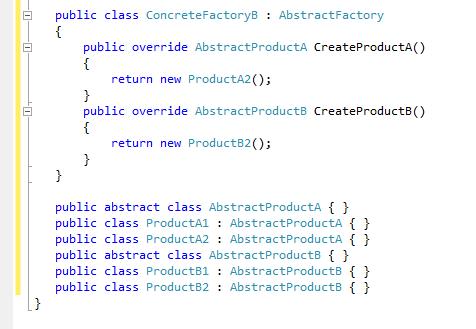
The concrete factory classes are inheriting from Abstractfactory class and override the method of base class to generate a set of related objects required by client. There can be n number of concrete factory classes depending on software or application requirement.
Abstractproduct is the base class for the types of objects that factory class can create. There should be one base type for every distinct types of product required by client. The concrete product classes are inheriting from Abstractproduct class. Each class contains specific functionality. Objects of these classes are generated by abstractfactory classes to populate client.

Real World Example of Abstract Factory Design Pattern using C#.NET

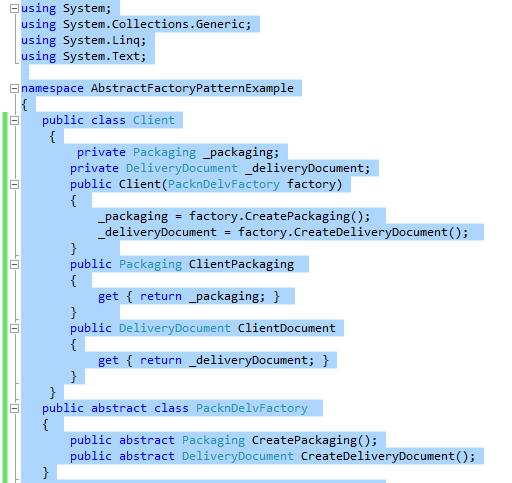
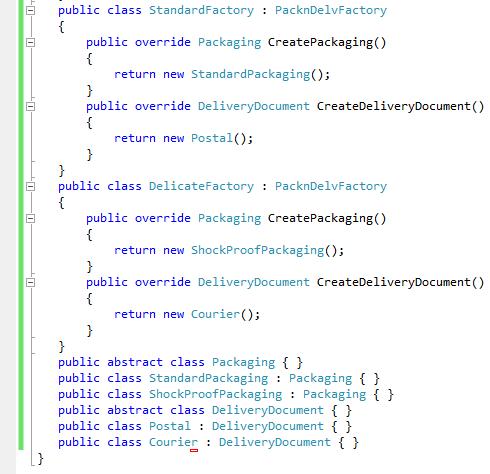
As an example, consider a system that does the packaging and delivery of items for a web-based store. The company delivers two types of products. The first is a standard product that is placed in a box and delivered through the post with a simple label. The second is a delicate item that requires shockproof packaging and is delivered via a courier.
In this situation, there are two types of objects required, a packaging object and a delivery documentation object. We could use two factories to generate these related objects. The one factory will be responsible for creating packaging and other delivery objects for standard parcels. The second will be responsible for creating packaging and delivery objects for delicate parcels.

Class Client

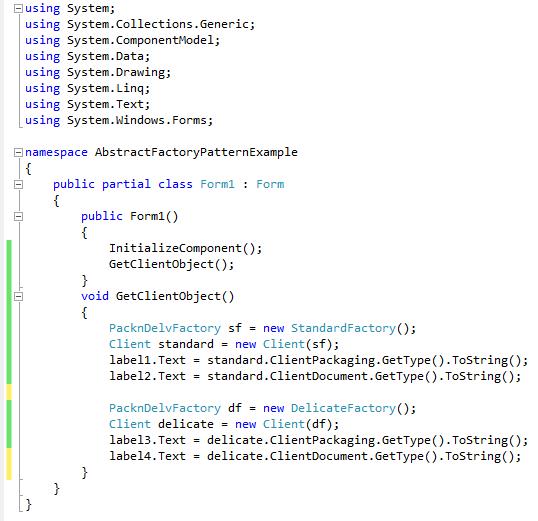
AbstractFactory Patterns Form

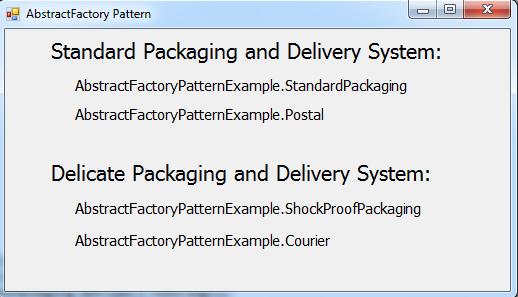
OUTPUT

In the above example, code creates two client objects, each passing to different type of factory constructor. Types of generated objects are accessed through the client properties.
Note
While studying abstract factory pattern, one question comes in my mind, i.e., what are concrete classes? So I Google searched the same and below is the answer to my question.
Concrete class is nothing but normal class, which is having all basic class features, like variables, methods, constructors, etc.
We can create an instance of the class in the other classes.

2) Singleton

Singleton design pattern is one of simplest design patterns. This pattern ensures that class has only one instance and provides global point of accessing it. The pattern ensures that only one object of a particular class is ever created. All further references to objects of the singleton class refer to the same underlying instance.
There are situations in a project where we want only one instance of the object to be created and shared between the clients. No client can create an instance from outside. It is more appropriate than creating a global variable as this may be copied and leading to multiple access points.
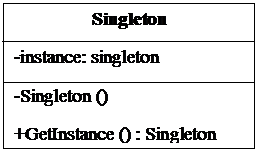
The UML class diagram below describes an implementation of the abstract factory design pattern:
In the above singleton patterns UML diagram “GetInstance” method should be declared as static. This method returns single instance held in private instance” variable. In singleton pattern, define all the methods and instance as static. The static keyword ensures that only one instance of object is created and you can call methods of class without creating object.
The constructor of class is marked as private. This prevents any external classes from creating new instances. The class is also sealed to prevent inheritance, which could lead to sub classing that breaks the singleton rules.
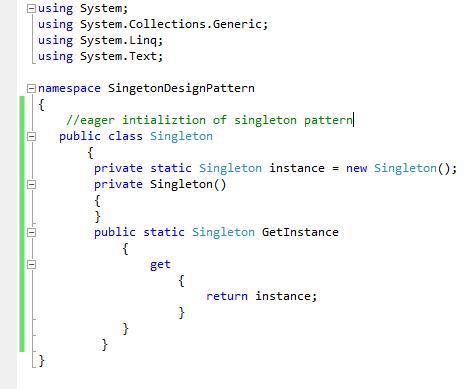
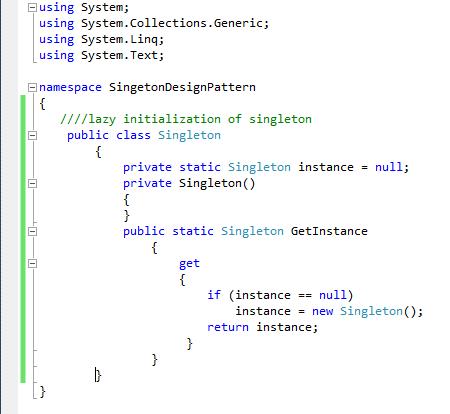
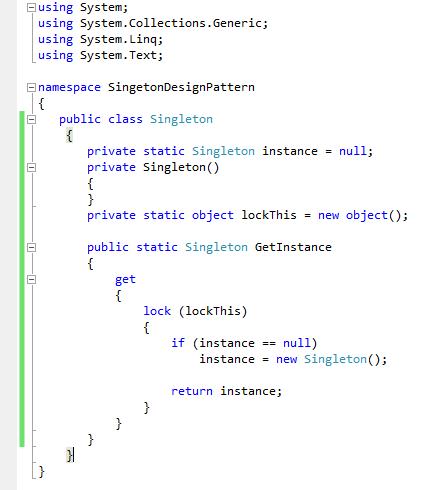
The following code shows the basic template code of the singleton design pattern implemented using C#.NET:
The eager initialization of singleton pattern is as follows:
Lazy initialization of singleton pattern:
Thread-safe (Double-checked Locking) initialization of singleton pattern:
In the above code "lockThis" object and the use of locking within the "GetInstance" method. As programs can be multithreaded, it is possible that two threads could request the singleton before the instance variable is initialized. By locking the dummy "lockThis" variable, all other threads will be blocked. This means that two threads will not be able to simultaneously create their own copies of the object.

Real World Example of Abstract Factory Design Pattern using C#.NET

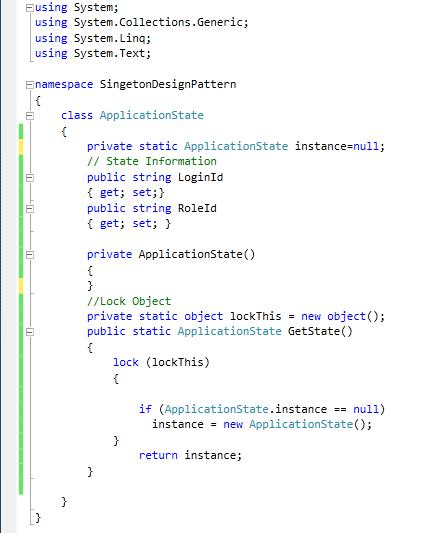
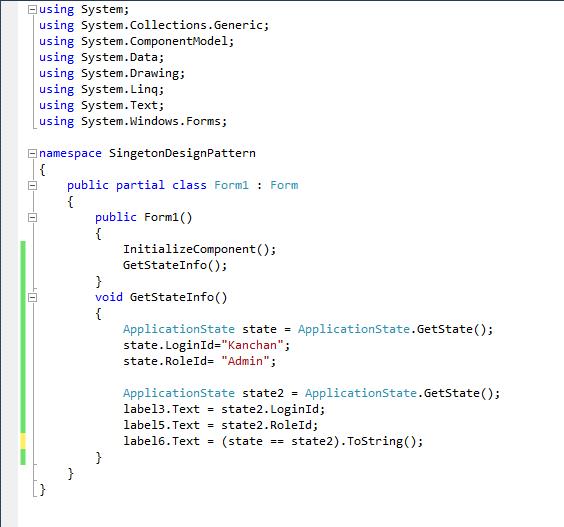
I am trying to apply this pattern in my application where I want to maintain application state for user login information and any other specific information which is required to be instantiated only once and held only one instance.

Class ApplicationState

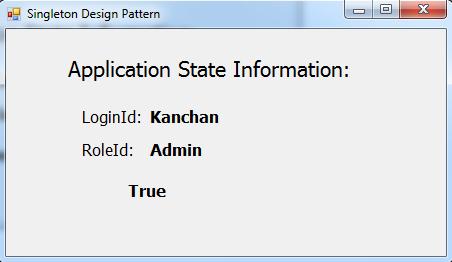
Singleton Pattern Form

OUTPUT

The above sample code creates two new variables and assigns the return value of the GetState method to each. They are then compared to check that they both contain the same values and a reference to the same object.
I hope this article will give you an introduction about design patterns and different types of design patterns used in .NET. In this article, we learned Abstract factory and Singleton design pattern in detail. Remaining patterns of creational design pattern group will be explained to you in my next article.

Wednesday, December 21, 2016

Sealed Class and Sealed Methods in C#

This article explains how to create and use a sealed class using C#. We will also review why programming gurus use sealed classes in their code and products.

Sealed classes are used to restrict the inheritance feature of object oriented programming. Once a class is defined as a sealed class, the class cannot be inherited. 

In C#, the sealed modifier is used to define a class as sealed. In Visual Basic .NET the NotInheritable keyword serves the purpose of sealed. If a class is derived from a sealed class then the compiler throws an error. 

If you have ever noticed, structs are sealed. You cannot derive a class from a struct.  


Sealed Class


Sealed class is used to define the inheritance level of a class.

The sealed modifier is used to prevent derivation from a class. An error occurs if a sealed class is specified as the base class of another class. 

Some points to remember:  

1.  A class, which restricts inheritance for security reason is declared, sealed class.
2.  Sealed class is the last class in the hierarchy.
3.  Sealed class can be a derived class but can't be a base class.
4.  A sealed class cannot also be an abstract class. Because abstract class has to provide functionality and here we are
     restricting it to inherit.

Practical demonstration of sealed class

using System;
using System.Collections.Generic;
using System.Linq;
using System.Text;

namespace sealed_class
{
    class Program
    {
        public sealed class BaseClass
        {
            public void Display()
        {
            Console.WriteLine("This is a sealed class which can;t be further inherited");
        }
    }

        public class Derived : BaseClass
        {
            // this Derived class can;t inherit BaseClass because it is sealed
        }
   
        static void Main(string[] args)
        {
            BaseClass obj = new BaseClass();

            obj.Display();

            Console.ReadLine();
        }
    }
}

Sealed Methods


Sealed method is used to define the overriding level of a virtual method.

Sealed keyword is always used with override keyword. 

Practical demonstration of sealed method


using System;
using System.Collections.Generic;
using System.Linq;
using System.Text;

namespace sealed_method
{
    class Program
    {
        public class BaseClass
        {
           
            public virtual void Display()
            {
                Console.WriteLine("Virtual method");
            }
        }

       public class DerivedClass : BaseClass
        {
            // Now the display method have been sealed and can;t be overridden
            public override sealed void Display()
            {
                Console.WriteLine("Sealed method");
            }
        }

       //public class ThirdClass : DerivedClass
       //{

       //    public override void Display()
       //    {
       //        Console.WriteLine("Here we try again to override display method which is not possible and will give error");
       //    }
       //}

        static void Main(string[] args)
        {

            DerivedClass ob1 = new DerivedClass();
            ob1.Display();

            Console.ReadLine();
        }
    }
}

Hope this article will give you better view of sealed class and sealed method. Waiting! for your valuable feedback.

Why should we use MVC vs normal ASP.NET?

There are various positive points to moving towards MVC

1.  TDD support out of the box as most of the design is based on interfaces.
2.  SEO friendly URL by design (though now this is possible in ASP.NET 4 as well)
3.  No ViewState (this may seem a bit of moving backward to some), but overall a good design decision.
4.  Clean View Markup (no additional HTML emitted)
5.  100% extensible.  You can add your own controller with IOC, switch view engines at will, control model binding at wish etc.
6.   Rich UI support (possible through client side JS libraries like jQuery UI and others).  Telerik has released some controls for MVC which includes Grid control as well (which are merely HTMLHelpers)
7.  Session, JS, Ajax works.  Validation is even more powerful with DataAnnotations and jquery.
8.  Is MVC faster?  Yes by default because of lack of viewstate and clean markup.  But performance is subject and MVC by design is more performant that traditional ASP.NET webforms (though webforms can be made as fast as required.
9.  Out of the box support for mitigating antiforgery attacks and XSS vulnerability (though asp.net does has this to some extent)
10.  Out of the box minimal IOC support.
11.  Full control over rendered HTML
12.  Pluggable architecture
13.   And much more....

Couple of limitations (though not exactly)
1.  Learning curve as most asp.net developers are used to windows form model for web development.


NOTE:  Webforms is not bad.  But by design it encourages many bad practices.  A webform at the hands of careful developer is as or could be even more productive than MVC.  Just my thought.

Additional readings at http://msdn.microsoft.com/en-us/magazine/dd942833.aspx

Hope this helps.

Friday, December 9, 2016

Exploring Connection In ADO.NET

What is connection in ADO.NET?

ADO.NET connection is an object of connected architecture just like any other C# object. When the connection of an object is instantiated , use a constructor with single string type of an argument. This argument is called the connection string. Once the connection string is passed in the connection object, by connection of an object, you can establish a connection with the database. With the help of this connection, string will identify the database and the Server name, and authentication parameters (User ID, password). Basically, a connection string is typically stored in web.config file.

What namespace or provider is used for connection class?

ADO.NET provides connection to the multiple providers but it depends on your working condition, which means, what database is used in backend and how to communicate between client to server. Thus, now the data provider is used.
  • Data Provider for SQL Server (System.Data.SqlClient).
  • Data Provider for MSACCESS (System.Data.OleDb).
  • Data Provider for MYSQL (System.Data.Odbc).
  • Data Provider for ORACLE (System.Data.OracleClient).
How to use connection class with this provider is given below-
  • Connection object for SQL Server (SqlConnection).
  • Connection object for MSACCESS (OleDbConnection).
  • Connection object for MYSQL (OdbcConnaction).
  • Connection object for ORACLE (OracleConnection).
Before working with the database, you have to add the data provider namespace, by placing the following at the start of your code module.

For SqlClient .NET data provider namespace, using-

            Using System.Data.SqlClient  

Similarly, for OLE DB, ODBC, OracleClient .NET data provides namespace, using-
            Using System.Data.OleDb 
            Using System.Data.Odbc 
            Using System.Data.OracleClient 

Properties of connection object  
PropertyDescription
AttributesWe can get or set attributes of the connection object.
Command Timeout
By Command time out, we can get or set number of seconds to wait, while attempting to execute a command.
Connection TimeoutBy Connection time out, we can get or set number of seconds to wait for the connection to open.
Connection StringConnection string is used to establish and create connection to data source by using server name, database name, user id and password.
Cursor LocationIt gets or set slocation of cursor service.
Default DatabaseIt gets or returns default database name.
Isolation LevelIt gets or returns isolation level.
ModeBy mode property, we can check provider access permission.
ProviderBy this property, we can get or set provider name.
StateBy this property, we can check your current connection open or close before connection opening or closing
VersionThis returns the ADO version number.
Method of connection object 
MethodDescription
BeginTransactionBegin to current transaction.
CancelCancel an execution.
CloseClose method is used, when any current connection is open and finally its closed after completed execution.
OpenOpen method is used, if current connection is close then before execution started. First of all You have opened connection must.
ExecuteBy this method it is used to execute query. Like as Statement, procedure or provider provides specific text.
OpenSchemaIt returns schema information from the provider about the data source.
RollBackTransationThis method invokes, whenever you cancel any changes or any conflict occurs in the current transaction, it ends the current transaction.
CommitTransationIf current transaction execution is successfully completed, it ends the current transaction.


Connection Pooling 

When establishing a connection, the database Server is a heft and high resource consuming process. If any Application needs to fire any query against any database Server we need to first establish a connection with the Server and then execute a query against that database Server.

Afterwards, it involves the overhead of the network label handshaking. ADO.NET uses a technique called connection pooling, which is minimize the cast of opening and closing connections. Connection pooling is reused in an existing active connection with the same connection string, instead of creating a new connection string. Thus, several pools exist, if different connection string asks for the connection pooling.

You can turn off pooling for a specific connection by including the pooling=”false” key-value pair in your connection string.

The sqlconnection class also includes two method ClearPool and ClearAllPools, which lets you clear its associated pool.

Connection string pooling attributes 
  • Connection Lifetime - When we have specified connection lifetime sizes, it means this indicates the length of time in seconds after connection creation. Thus, by default, it is 0. This indicates that the connection will have maximum timeout. 
  • Connection Reset - This property specifies the connection is reset, when removed from the pool. This is by default is true.
  • Load Balance Timeout - When we have specified connection lifetime sizes, this indicates the length of time in seconds. A connection can remain idle in a connection pool before being removed.
  • Max Pool Size - Maximum pool sizes indicate the maximum number of connections allowed in the pool. The default is 100.
  • Min Pool Size - Maximum pool sizes indicate the minimum number of connections maintained in the pool. The default is 0.
  • Pooling: - When pooling is set true, the connection is drawn from the appropriate pool, else if it is necessary, create and add to the appropriate pool. By default, it is true.